You can easily access our extensive FAQ section, which is designed to swiftly address common queries and promptly resolve any issues you might encounter.
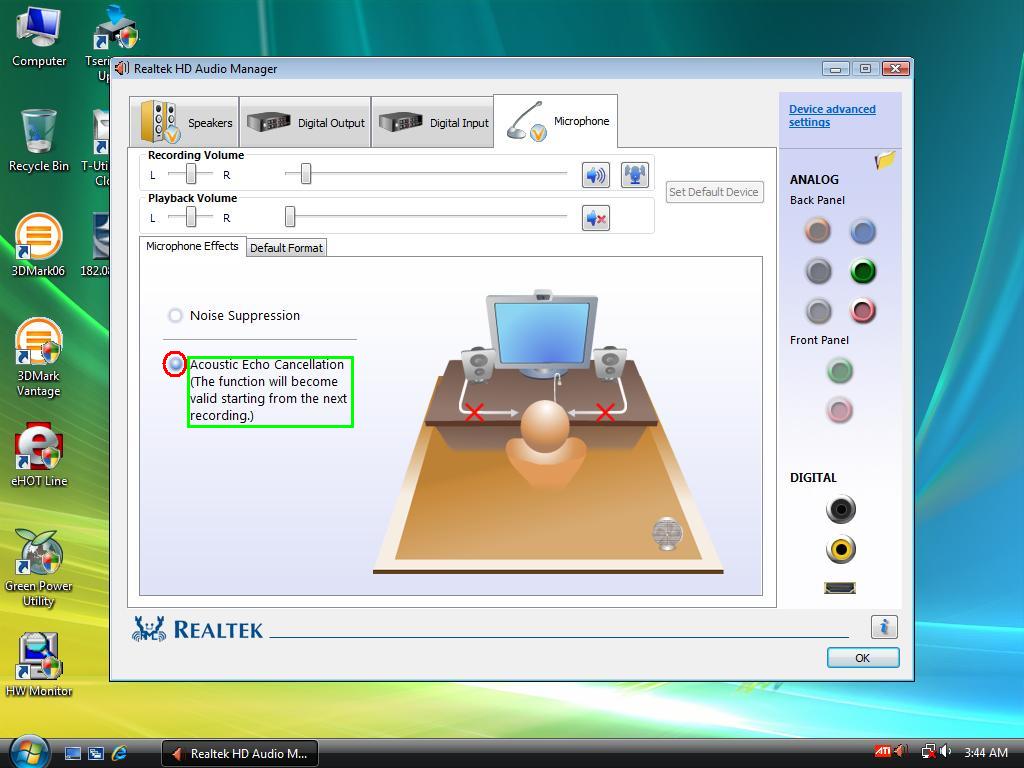
Why I will hear the back ground noice when use microphone?
This noise is the echo sound from speaker to microphone.
Open the Realtek audio utility then disable the Mic echo in the Microphone setting.
Please refer attached picture for detail.
Q2
Why my system does not support USB 2.0?
USB 2.0 driver will support by the Windows XP SP2 or SP3 version.
Please log on the Microsoft website to download the latest service pack for your OS.
Also check the cable which supports USB 2.0, otherwise, USB speed might not run at USB 2.0 speed.
Q3
Why motherboard cannot detect microphone in Vista when connected to back panel?
1. Please refer the picture for setting two different Microphone input control as Front and Rear at same time. It will be able to detect the rear microphone properly.
2. For set the front audio as default Mic output, please see this picture.
3. For set the front audio as default Mic output, please see this picture.
Q4
What is the meaning of T-Series motherboard's POST LED?
LED1 LED2 both off >> BIOS related problem or motherboard abnormal
LED1 on, LED2 off >> memory error
LED1 off, LED2 on >> VGA error
LED1 LED2 both on >> Normal
Q5
Why there is no audio output when I use HDMI® output for the ATI VGA card?
Why my system cannot boot up properly after assembly AM2 CPU motherboard?
This might be memory compatible issue. Please try to change the following setting in CMOS to fix the problem.
1. Clear CMOS then reboot the system.
2. Try to change CPU or memory module if system still won't boot.
3. After boot up, press Delete key in POST goto CMOS> Performance > Memory timing config > Memory config > Power down > disable.
4. Save and exit the CMOS, then reboot the system.
Q9
Why after updated PC BIOS to latest version, the PC does not boot up with 95W limitation exceed message after POST?
We add CPU max watt limit up to 95W for some Micro ATX motherboard (include T-series). If you see this warning message, it means the CPU power you use is over motherboard's design limitation. Please refer CPU support form to change CPU lower than 95W.
Q10
Why can not use LAN GHOST on AMD 780G or 790G chipset motherboard?
If use SATA hard drive on AMD 780G or 790G chipset motherboard, it will need to set following setting in CMOS to make LAN GHOST work properly.
If use SATA 1 to 4 port, need to set CMOS > Chipset > Southbridge Configuration > OnChip SATA Type > Legacy IDE
If use SATA 5 or 6 port, need to set CMOS > Chipset > Southbridge Configuration > OnChip SATA Type > Native IDE
This website utilizes cookies to enhance your browsing experience. By continuing to use our website, you consent to the use of all cookies as described in our cookie policy.